
On this page
Choose the order, merge, then inspect the actual file
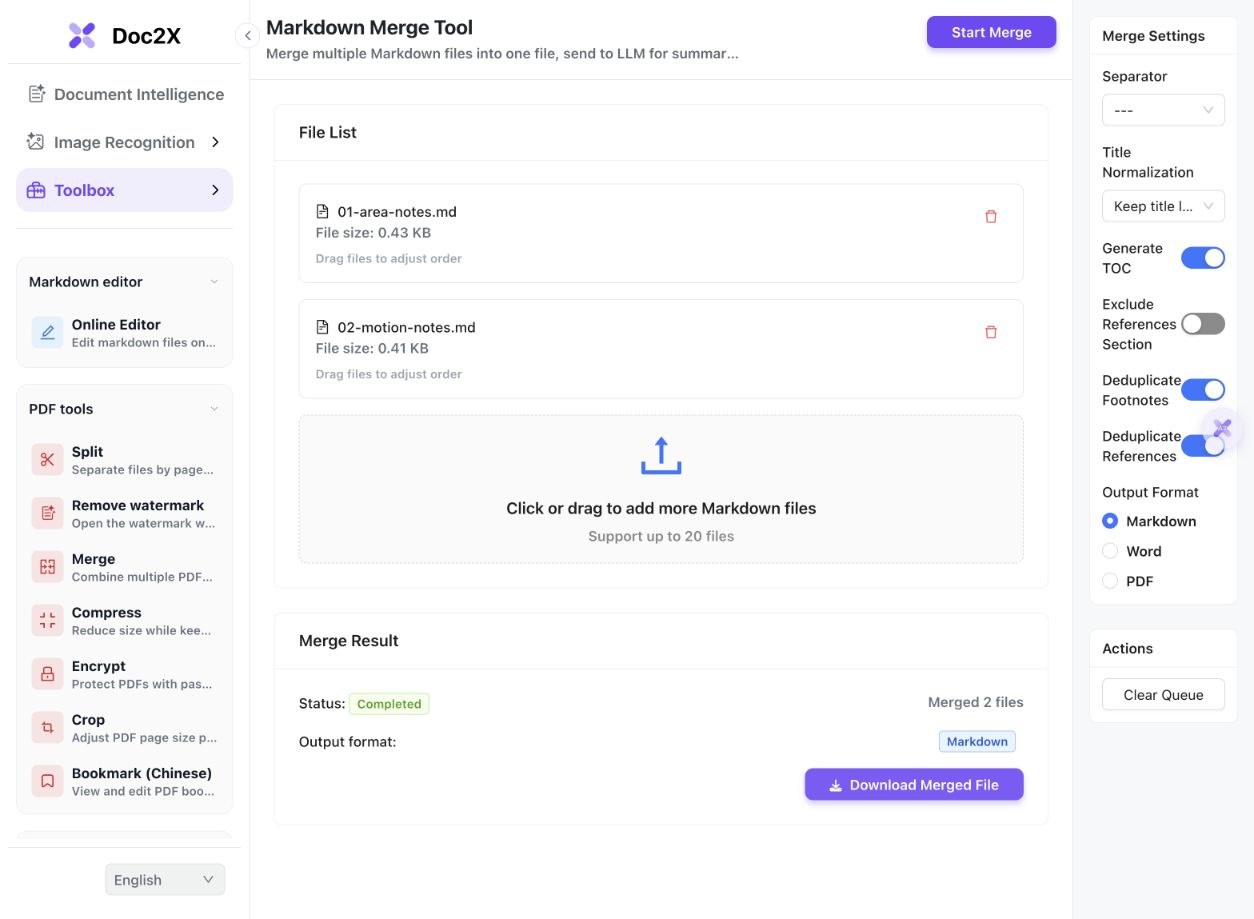
- Open the English Markdown merge tool and click Select Files. Add the notes you want to combine. Keep original files and any image resources separately.
- Confirm the File List order. The first test selected Area notes before Motion notes; a second queue selected them in reverse. Filenames are a useful cue, but inspect the actual queue.
- Choose Separator and Title Normalization. The tested settings use a horizontal-rule separator and Keep title level, with Generate TOC enabled.
- Review Deduplicate Footnotes and the reference options. The notes share one identical footnote text but use the same unit label for different meanings. Reference-section removal was left off.
- Select Markdown under Output Format, click Start Merge and wait for Completed. Click Download Merged File and keep the unchanged download for comparison.
- Open the result in your intended renderer. Check file order, table values, equations, TOC destinations and footnote meanings. A completed merge does not establish compatibility with every editor or export format.
The current tool accepts up to 20 files. This test used two authored MD files and three actual merges; it did not run OCR, translation, Word or PDF export.
Two inputs, three actual Markdown outputs
On 14 October 2026, we merged two self-authored English teaching notes in the English tool. We downloaded the default result, a result with footnote deduplication off and a result with reversed file order. The three native MD files are unchanged.
 Enlarge image ↗
 Enlarge image ↗
 Enlarge image ↗
| Case | File order | Footnote definitions / references |
|---|---|---|
| Default | Area → Motion | 3 / 4 |
| Deduplication off | Area → Motion | 4 / 4 |
| Reversed queue | Motion → Area | 3 / 4 |
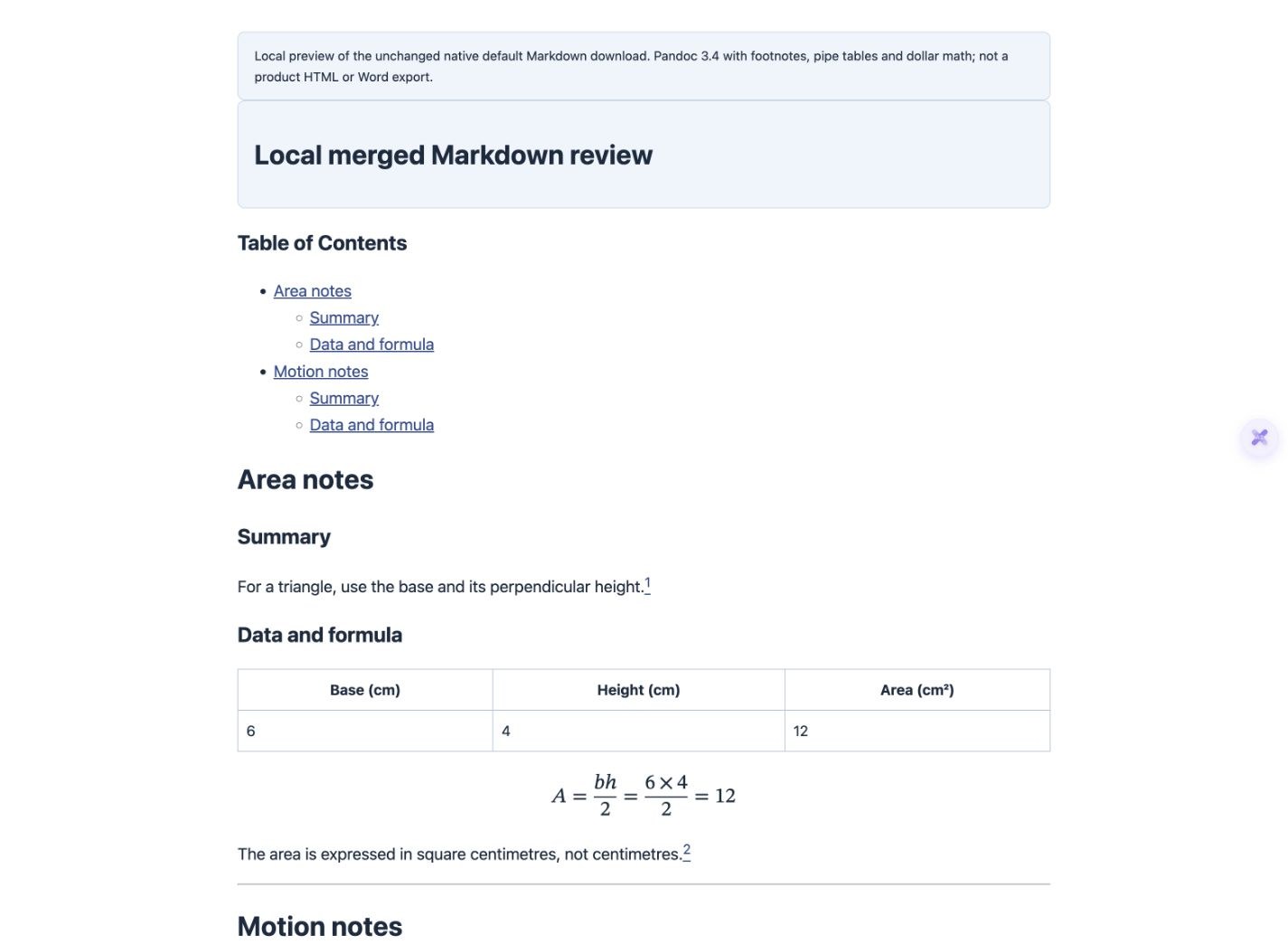
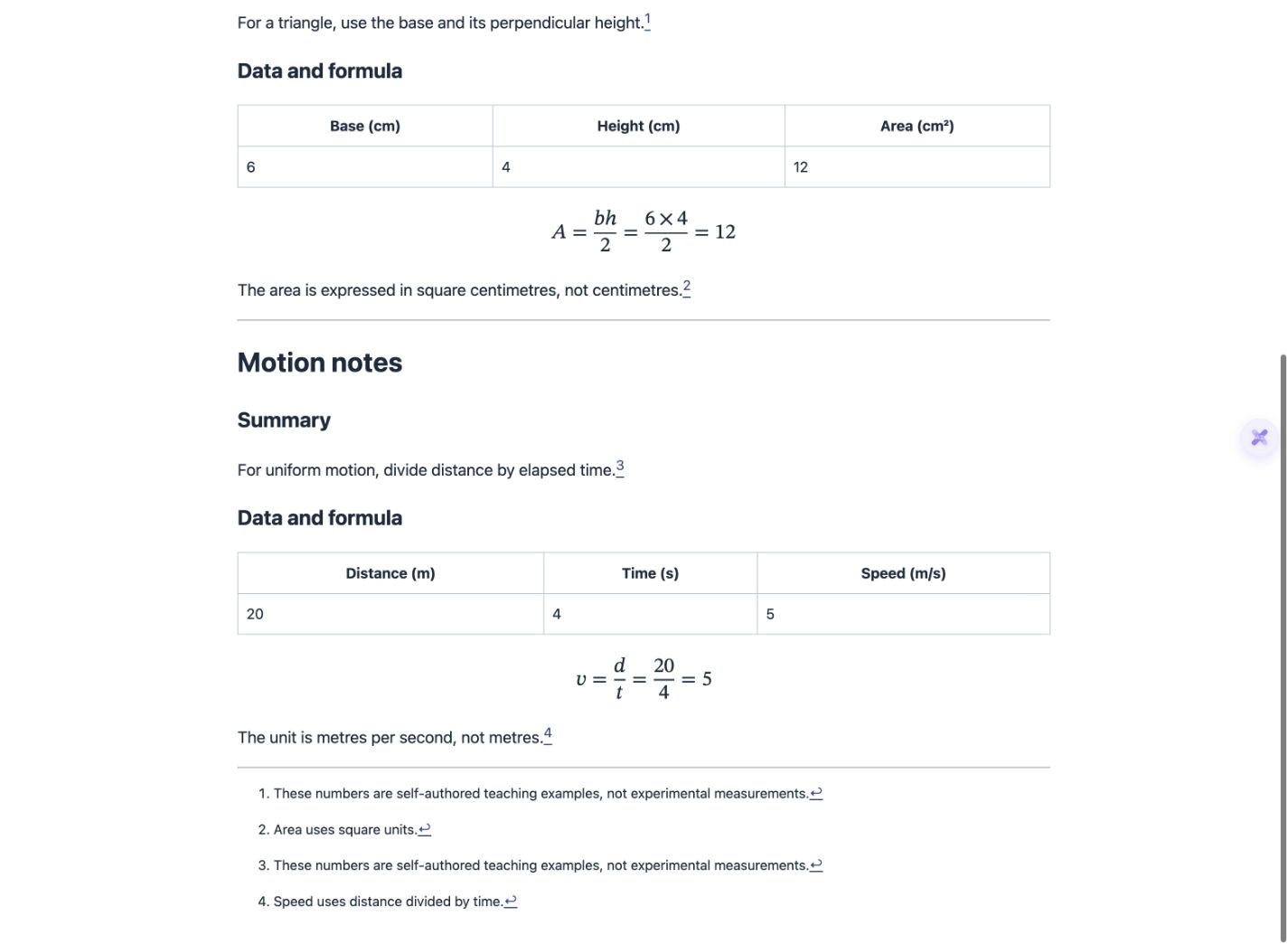
- All three outputs retain both tables: 6, 4, 12 for the triangle and 20, 4, 5 for motion. Both dollar-delimited formula source strings remain unchanged.
- The generated TOC has six distinct targets. The second Summary uses summary-1, and the second Data and formula uses data-and-formula-1. Reversing the queue changes which note owns the first target.
- With deduplication enabled, the identical source note has one definition used by both notes. The two different unit explanations remain separate; the colliding label is renamed.
- With deduplication off, both copies of the source note remain as separate definitions. Label collisions are still renamed in this observed output, so the area and motion unit meanings remain correct.
- In a local Pandoc 3.4 preview, all six TOC targets exist, both tables and equations render, and the second Summary link reaches Motion notes. The motion unit footnote and its return link were clicked in Chrome.
- Pandoc displays four footnote entries from the default MD even though the source has only three definitions. Its repeated-reference display is separate from the tool’s source deduplication.
The screenshots use actual product UI or clearly labelled local Pandoc rendering. Local HTML, styles and the proof ZIP were prepared after downloading; they are not product exports. This example does not test images, multiline footnotes, bibliography removal, native Word/PDF output or other Markdown renderers. Reversed input selection was verified; drag reordering was not tested.
What to check
Select the Markdown files, confirm their queue order and choose the separator, heading and table-of-contents options. Keep Markdown as the output, click Start Merge, then download and inspect the file in your destination editor. Duplicate headings need distinct link targets; footnotes with the same label may have different meanings. The actual examples below compare default merging, footnote deduplication off and reversed file order.
- Actual inputs
- Two short English notes with repeated section names, two tables and two formulas.
- Default output
- Area then Motion; six TOC links, four footnote references and three definitions.
- Footnotes off
- Four definitions; colliding labels still receive separate IDs in this sample.
- Renderer boundary
- Pandoc displays four footnote entries even when the MD defines only three.
What changed in the merged source?
Repeated section labels have different TOC targets
- [Area notes](#area-notes)
  - [Summary](#summary)
- [Motion notes](#motion-notes)
  - [Summary](#summary-1)
Excerpt from the actual default TOC. The target must also exist in the destination renderer; the visible label alone is insufficient.
Two unit notes must keep different meanings
[^unit]: Area uses square units.
[^doc2x-footnote-1]: Speed uses distance divided by time.
Actual default definitions. The second note’s reference was rewritten to its new ID, rather than attaching the speed statement to the area definition.
Choose the setting, then verify the right thing
| Setting or action | What this test shows | What still needs review |
|---|---|---|
| File order | Reversed selection gives Motion before Area | The actual queue and complete content order |
| Generate TOC | Six distinct links for six source headings | Whether the destination generates matching IDs |
| Deduplicate Footnotes on | One shared definition plus two distinct unit definitions | Rendered numbering and meaning at each reference |
| Deduplicate Footnotes off | Four definitions, with colliding labels renamed | Whether repeated definitions are desirable |
| Word or PDF output | Not exercised in this test | Use the separate export workflow and inspect its actual file |
Queue order becomes document order
The output begins with the first selected file’s content. Reversing the queue changes both the top-level note order and which repeated section gets an unsuffixed TOC target. Check the first and last section of each note before distributing a combined document.
A repeated title is not a unique destination
Both inputs use Summary and Data and formula. The merger gives the second set of TOC destinations a -1 suffix, and the tested Pandoc preview produces matching IDs. Other editors or Word conversions may produce different targets; check actual links after the final conversion.
Same footnote label does not mean same content
Both inputs call a note unit, but one explains area and the other speed. In all three outputs the meanings remain separate. The label is renamed when needed and its reference follows the new definition. Inspect the definition text rather than only the numeric display.
Source deduplication and displayed numbering are separate
The source note text is identical in both inputs. Deduplication on stores it once in the merged MD, while the local Pandoc renderer still displays it twice for two references. Turning deduplication off retains both definitions. Neither setting guarantees identical numbering across editors.
Tables and equations need the destination’s support
The Markdown table strings and dollar-delimited equations remain in these downloads. The local preview enables pipe tables, footnotes and dollar math explicitly. If a target app displays source syntax instead, check its supported extensions before assuming the merger removed the content.
Keep images and final export checks in the workflow
These sample notes contain no pictures or bibliography. Do not infer that selecting MD files packages image binaries, fixes relative paths or validates reference removal. For Word output, inspect its tables, equation objects and navigation separately; the related guide contains that different workflow.
Detailed tool instructions
English Help covers file order, title handling, TOC and footnote options, with separate Word and PDF export conditions.
Troubleshooting
- The combined notes start with the wrong chapter
- Check the actual queue order and merge again from the original files.
- A TOC label exists but does not jump
- Compare the link fragment with the actual heading ID in the destination renderer.
- Two notes use the same footnote label
- Inspect the rewritten reference and both definition texts. Labels alone cannot establish shared meaning.
- The source has three definitions but the preview shows four notes
- A renderer can generate a displayed note per reference. This occurs in the provided local Pandoc preview and is not an extra source definition.
Frequently asked questions
How do I combine multiple Markdown files into one?
Select the files in the merge tool, confirm their order and options, choose Markdown, start the merge and download the result. The two input notes and three actual outputs are available here.
Will duplicate headings break the table of contents?
They need unique destinations. This sample uses -1 targets for the second headings, and all six links match the local Pandoc preview. Other renderers require their own check.
Does disabling footnote deduplication leave colliding labels unchanged?
Not in this sample. Separate definitions are retained, but colliding IDs are still renamed so the area and speed notes keep their respective meanings.
Does deduplication guarantee only one visible footnote?
No. The default source has three definitions and four references; Pandoc displays four entries. Check source definitions and renderer behavior separately.
Does this prove the direct Word and PDF options?
No. This test downloads Markdown only. The linked Word workflow has separate native-file checks and limitations.
Checked: 2026-10-14. Check the current tool for limits and conditions.