
On this page
From PDF upload to a complete LaTeX project
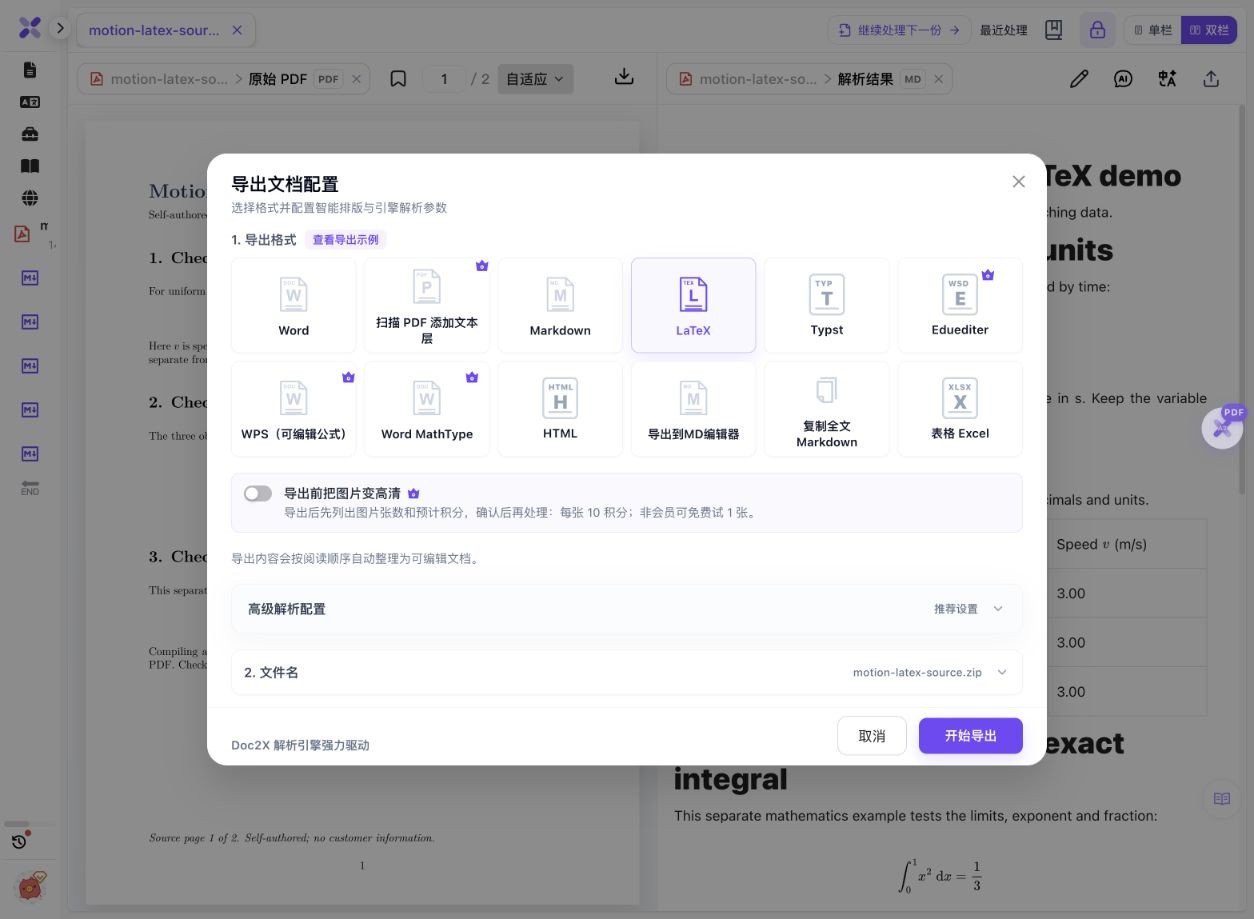
- Open PDF parsing, click Start parsing file (开始解析文件), select the PDF and confirm the page range in Start parsing (开始解析). This check processed source pages 1–2.
- Compare the parsed result with the PDF: check formula limits and subscripts, table values, chart titles, units and reading order.
- Click Export document (导出文档), select LaTeX and click Start export (开始导出). In this example, the optional image-enhancement switch remained off.
- Keep the downloaded ZIP intact. Extract the TeX file with its images folder; do not rename the ZIP to TEX or copy only the source file.
- For Overleaf, use New project → Existing project (.zip), then check the main document and compiler. This package uses fontspec; its verified local engine is XeLaTeX. Target fonts and packages still need to be available.
- Compile, inspect the first actual error or warning, and compare every page with the original PDF. Fixing an image path cannot restore content that was omitted during extraction.
The source and native download are public examples. Your own document uses current sign-in, quota and export conditions. This guide does not recover the author’s original macros, bibliography database or editable chart code.
A real ZIP that compiles—and a content omission to check
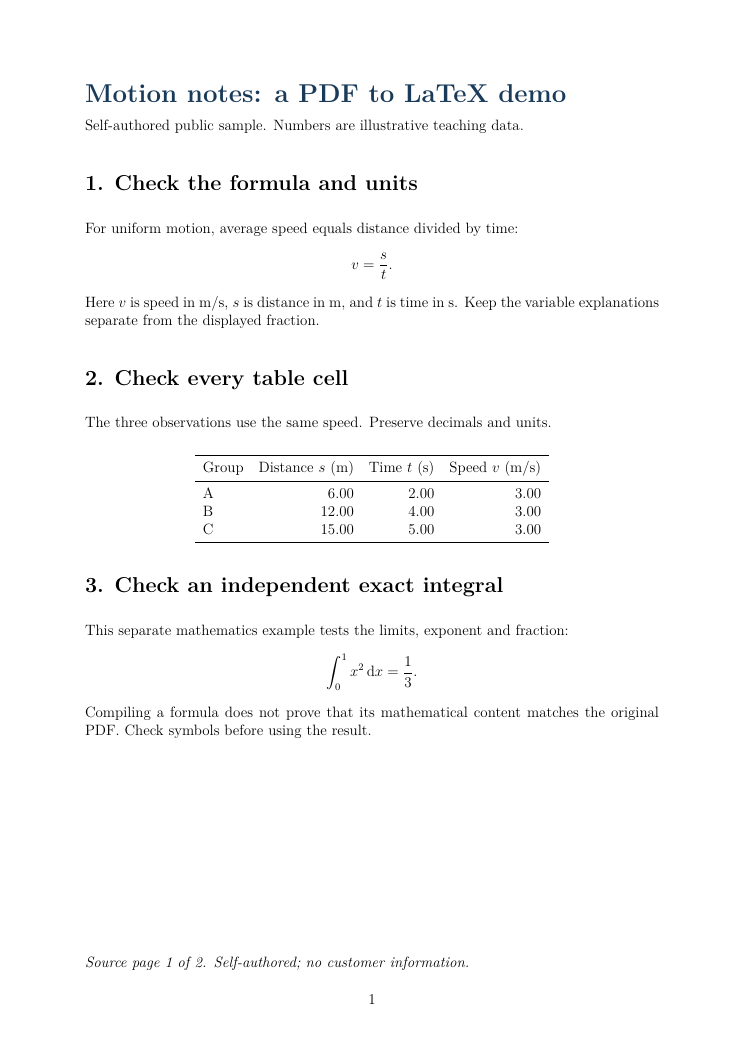
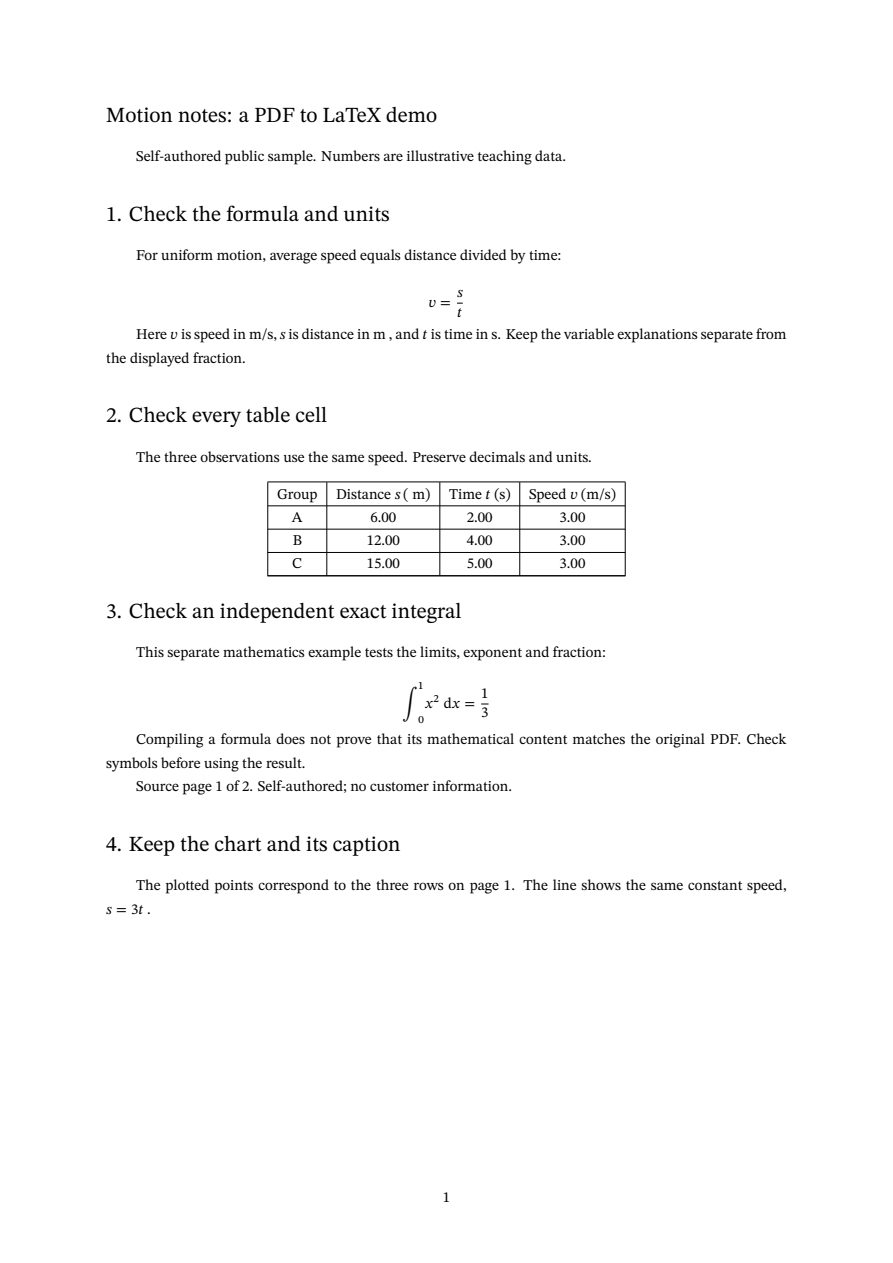
On 14 October 2026, we uploaded the authored motion-notes PDF again, parsed two pages and downloaded LaTeX. The native TeX and JPG match the earlier sample bytes. The new ZIP below is unchanged; the compiled PDF and previews were created locally from it.
 Enlarge image ↗
 Enlarge image ↗
 Enlarge image ↗
 Enlarge image ↗
| Case | Observed result | What it establishes |
|---|---|---|
| Complete ZIP, XeLaTeX | Exit 0; 2 PDF pages | This environment can compile the unchanged project. |
| Same files, pdfLaTeX | Exit 1; fontspec error | The engine choice matters before image handling. |
| TeX without its JPG | Exit 1; image cannot be loaded | The source alone is incomplete. |
| Original JPG restored | Exit 0; 2 pages; matching compiled text | Restoring the file fixes this missing-image case. |
- The exported table retains rows A: 6.00 / 2.00 / 3.00, B: 12.00 / 4.00 / 3.00 and C: 15.00 / 5.00 / 3.00. Check the associated distance, time and speed units as well as the numbers.
- The speed fraction and integral limits, exponent and result can be compared directly with the input PDF. A rendered formula is not proof of mathematical equivalence.
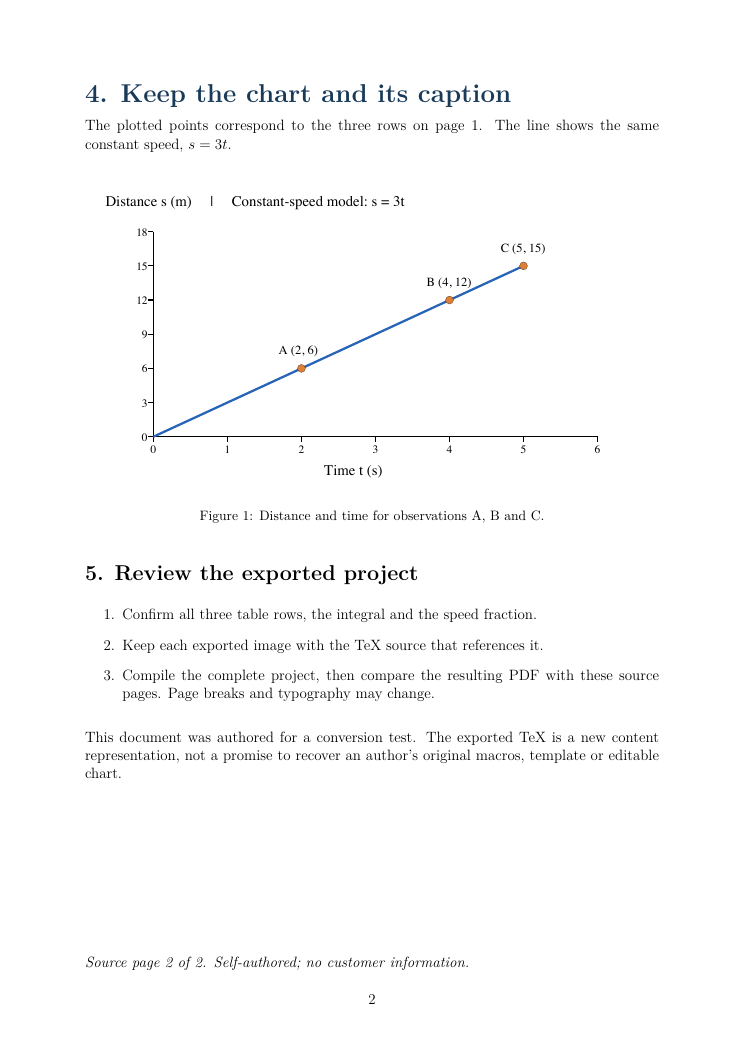
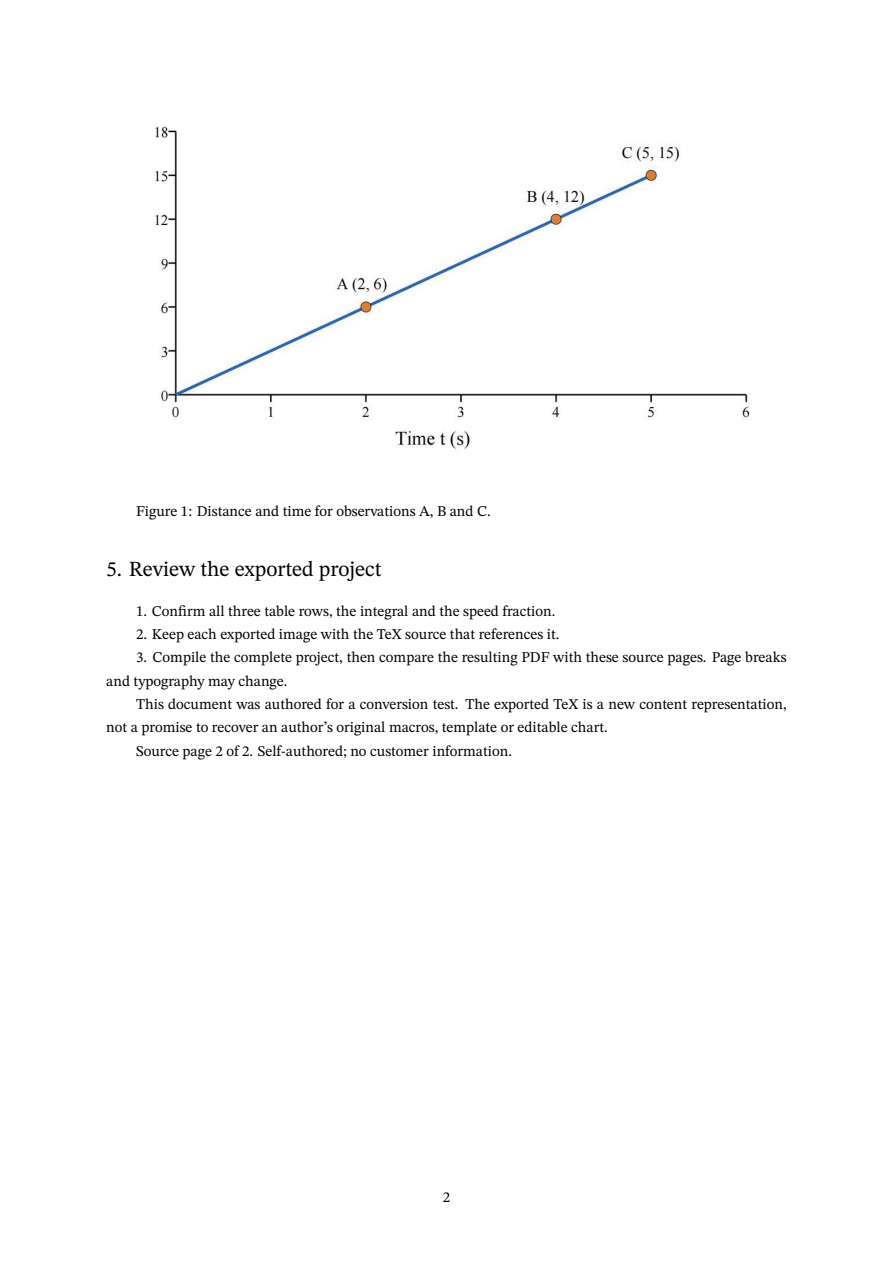
- The compiled PDF embeds the same JPG byte stream as the native ZIP. The original vector chart became a 1061 × 604 bitmap, not editable plotting code.
- “Distance s (m) | Constant-speed model: s = 3t” above the original chart is absent from both the exported JPG and TeX body. The three point labels, horizontal-axis label and caption remain.
This is one clear English electronic PDF. Native ZIP, TeX and JPG bytes were not edited. Local XeLaTeX generated the PDF, with font-substitution and geometry warnings; typography, table borders and pagination changed. The compiler process used a corrected local search path, without changing system settings or exported source. No Overleaf cloud upload or compilation, scanned-page accuracy test, bibliography recovery or original-template reconstruction is claimed.
What to check
Upload the PDF, review its parsed text, formulas and tables, then choose LaTeX in Export document. Keep the complete ZIP, including its images folder. This actual project compiles with XeLaTeX; pdfLaTeX stops at fontspec. For Overleaf, import the ZIP and check the main document, compiler and fonts. Compare the compiled PDF with the source before using the result.
- Actual source
- A two-page, self-authored English PDF with a fraction, an integral, a data table and a chart.
- Actual export
- One TeX file and one JPG, packaged together in a native ZIP.
- Local compilation
- Unchanged files compile into two pages with XeLaTeX / TeX Live 2023.
- Content limit
- The chart heading and distance-unit line are missing from the export; compilation alone does not catch that omission.
Use the real file names and inspect the first error
Native ZIP structure
motion-latex-source.tex
images/
  1_279_471_1061_604_0.jpg
Extract these together. The separately downloadable TEX has identical content but a public filename; the native ZIP retains the original project layout.
Local compilation used for this project
xelatex -no-shell-escape -interaction=nonstopmode -halt-on-error motion-latex-source.texRun from the extracted directory after installing the required engine, packages and fonts. nonstopmode controls prompts; it does not repair errors.
Actual image reference
\includegraphics[max width=0.9\textwidth]{images/1_279_471_1061_604_0.jpg}Keep the matching JPG at that relative path. The exported preamble supplies the image and sizing packages; copying this line into another template also needs the appropriate packages.
Observed wrong-engine error
! Fatal Package fontspec Error: The fontspec package requires either XeTeX or
(fontspec)                      LuaTeX.
The unchanged project passed with XeLaTeX in the stated environment. Do not delete font or math packages merely to suppress this message.
Separate compilation problems from content problems
| What you see | Check first | Then verify |
|---|---|---|
| fontspec requires XeTeX or LuaTeX | Compiler selection | Required fonts and package availability. |
| Unable to load picture or PDF file | Actual file, directory and case-sensitive path | The full image content, title and units. |
| Compiles locally but fails on Overleaf | Main document, compiler, TeX Live and fonts | The cloud log; local success is not a cloud test. |
| Image appears without a title or unit | Original PDF versus exported image and source | Add reviewed missing content separately. |
| Different fonts or page breaks | Warnings, template and available fonts | Content fidelity before visual styling. |
How to import a PDF-derived LaTeX ZIP into Overleaf
Overleaf’s official instructions use New project → Existing project (.zip). Upload the complete project ZIP, then check which TEX file is the main document. For this package it is motion-latex-source.tex. The official guide also recommends checking compiler type, TeX Live version and unnecessary top-level folders. This page verifies those instructions against the documentation; it does not present a local build as an Overleaf cloud run.
Why the default pdfLaTeX engine can fail
The downloaded source loads fontspec and names STIX Two Text, STIX Two Math, Arial and Courier New. In the controlled local check, pdfLaTeX fails at fontspec while XeLaTeX completes. A target environment may still lack fonts or packages; inspect its log and use permitted, available replacements when necessary.
Fix missing images without repeating OCR
The missing-image control changed only whether the exported JPG was present. Restoring that exact image under images/ allowed the unchanged TeX to compile again, with text matching the complete project. Start with files and paths when an existing export fails this way; a new PDF parsing task does not fix a file you forgot to copy.
A compiled PDF can still miss part of the original
The original chart has a distance-unit and constant-speed line above it. That line is outside the exported JPG and absent from the TeX body. Recompilation, changing the engine or restoring the same image cannot add it. Review the original and make any correction explicitly in a working copy; the downloads here retain the omission.
PDF to LaTeX is not recovery of the original paper project
The sample output changes headings, borders and page flow. It keeps the chart as a bitmap. The author’s original macros, labels, BibTeX database, journal class and plotting data are separate assets that may not be recoverable from a PDF. Use the export as a checked starting point before applying your own template.
What was—and was not—tested
This sample is a clear two-page English electronic document with a small table and two displayed formulas. Native export, local compiler behavior and an image-file recovery were checked. Handwriting, scans, multilingual typography, complex references, a full journal submission and Overleaf cloud compilation require their own validation.
Detailed tool instructions
English Help distinguishes environment self-checks from actual PDF conversion, and explains local XeLaTeX troubleshooting.
Official references
Troubleshooting
- I downloaded a ZIP but expected a TEX file
- Extract the archive. This download contains one TEX file and one JPG; renaming the archive does not convert it into source code.
- The formula renders, but its meaning looks wrong
- Compare limits, signs, exponents, fractions and variable definitions with the original PDF. Compilation checks syntax and typesetting, not the truth of the expression.
- Only the Overleaf preview is missing an image
- Use Overleaf’s official missing-image checks to separate draft/viewer behavior from an actual missing file. That cloud-specific case was not reproduced here.
- The chart is visible but its units are missing
- Compare the image and TeX with the source. This sample has an actual top-line omission, so a path repair alone is insufficient.
Frequently asked questions
Can I convert a PDF to LaTeX for Overleaf?
You can export parsed PDF content as a TeX-and-image ZIP, then use Overleaf’s ZIP import workflow. Check the main document, compiler, fonts and content. This guide includes a local XeLaTeX check, not a completed Overleaf cloud compilation.
Why do I need the images folder?
The TeX references an independent JPG by relative path. In the actual control, TeX alone failed; restoring the JPG at the original path fixed that error.
Does compiling successfully mean the PDF was converted perfectly?
No. The native output here compiles but omits a line above the original chart. Compare formulas, tables, units and captions with the source.
Will I get the original author’s Overleaf project?
Not necessarily. Original classes, macros, bibliography data and editable chart code are not established by this content export. The sample chart becomes a JPG.
Was this sample freshly exported?
Yes. The existing authored PDF was uploaded again on 14 October 2026. Its native TeX and JPG match the earlier sample bytes; the new ZIP and local compilation evidence are available above.
Checked: 2026-10-14. Check the current tool for limits and conditions.