
On this page
Keep the complete expression, then choose what to copy
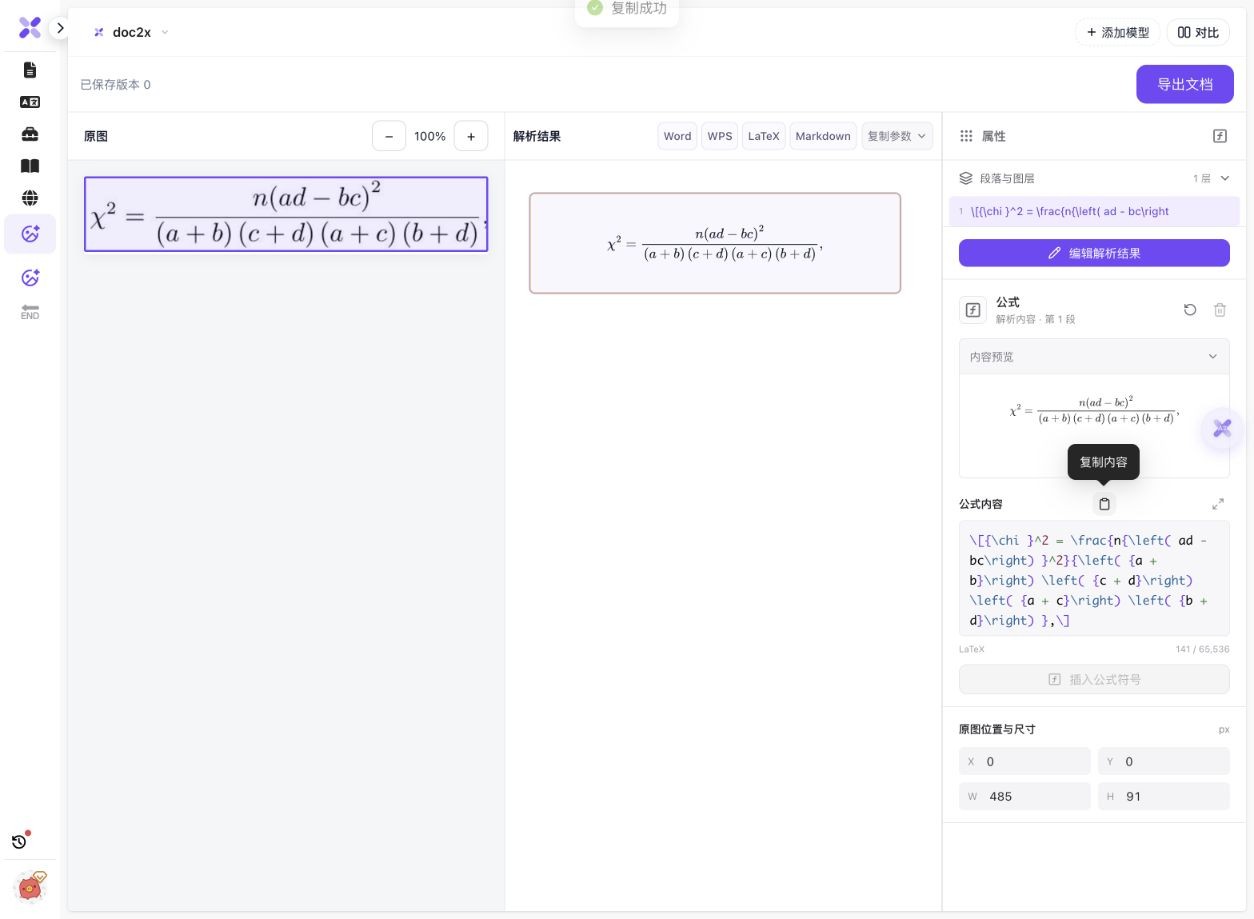
- Open image/document parsing and choose Start parsing file (开始解析文件). Select the formula image, or use the supported paste/drag entry. Keep the fraction bar, roots, exponents and all surrounding brackets inside the image.
- In Image recognition options (图片识别选项), confirm the image and start parsing (开始解析). This check used the original screenshot without scan enhancement.
- Compare the result with the source. In this example, inspect the square on chi, the square on the entire ad−bc term, and all four denominator factors.
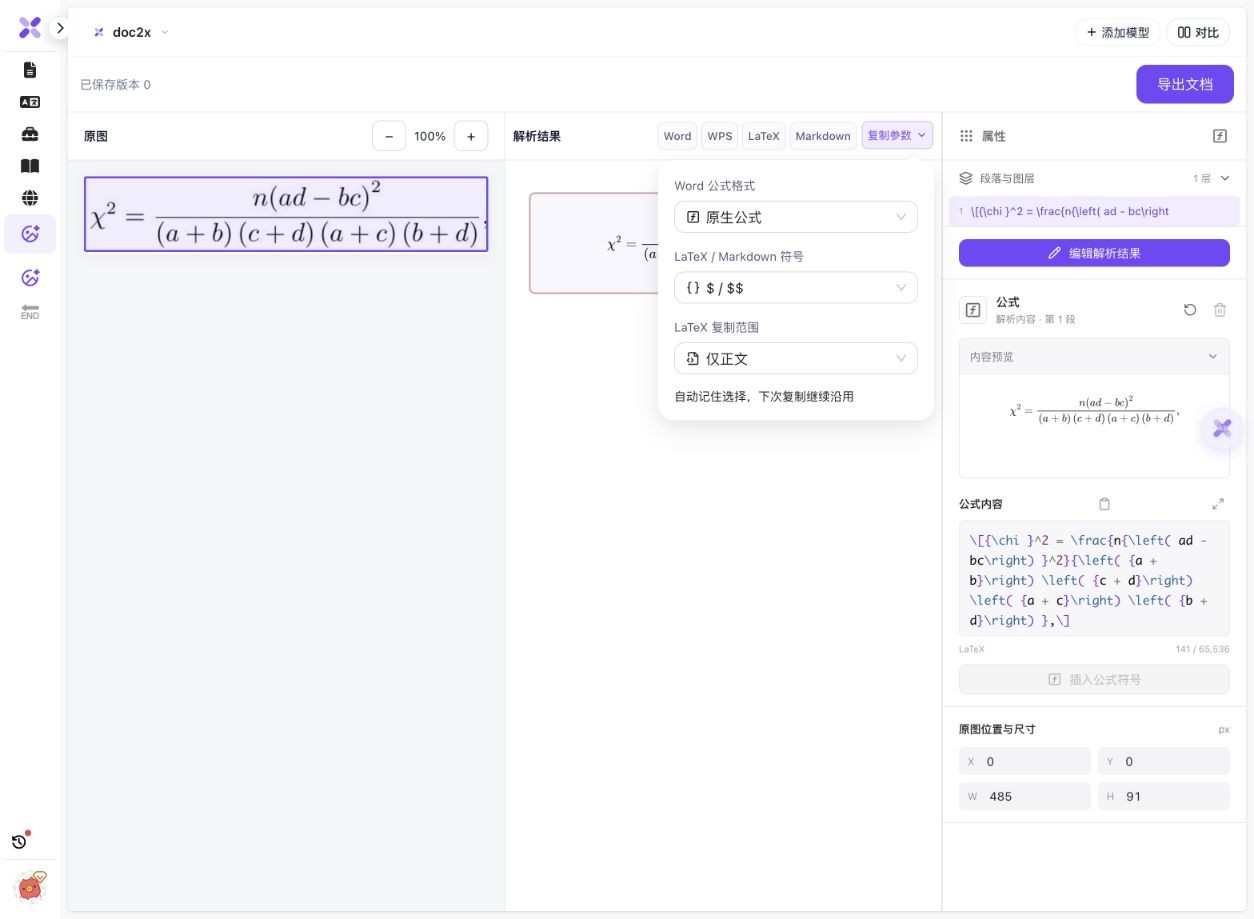
- For the whole result, open Copy parameters (复制参数) and check the LaTeX scope and delimiters, then use Copy LaTeX (复制 LaTeX). For a selected formula’s stored content, use Copy node content (复制节点内容) in its properties panel when available.
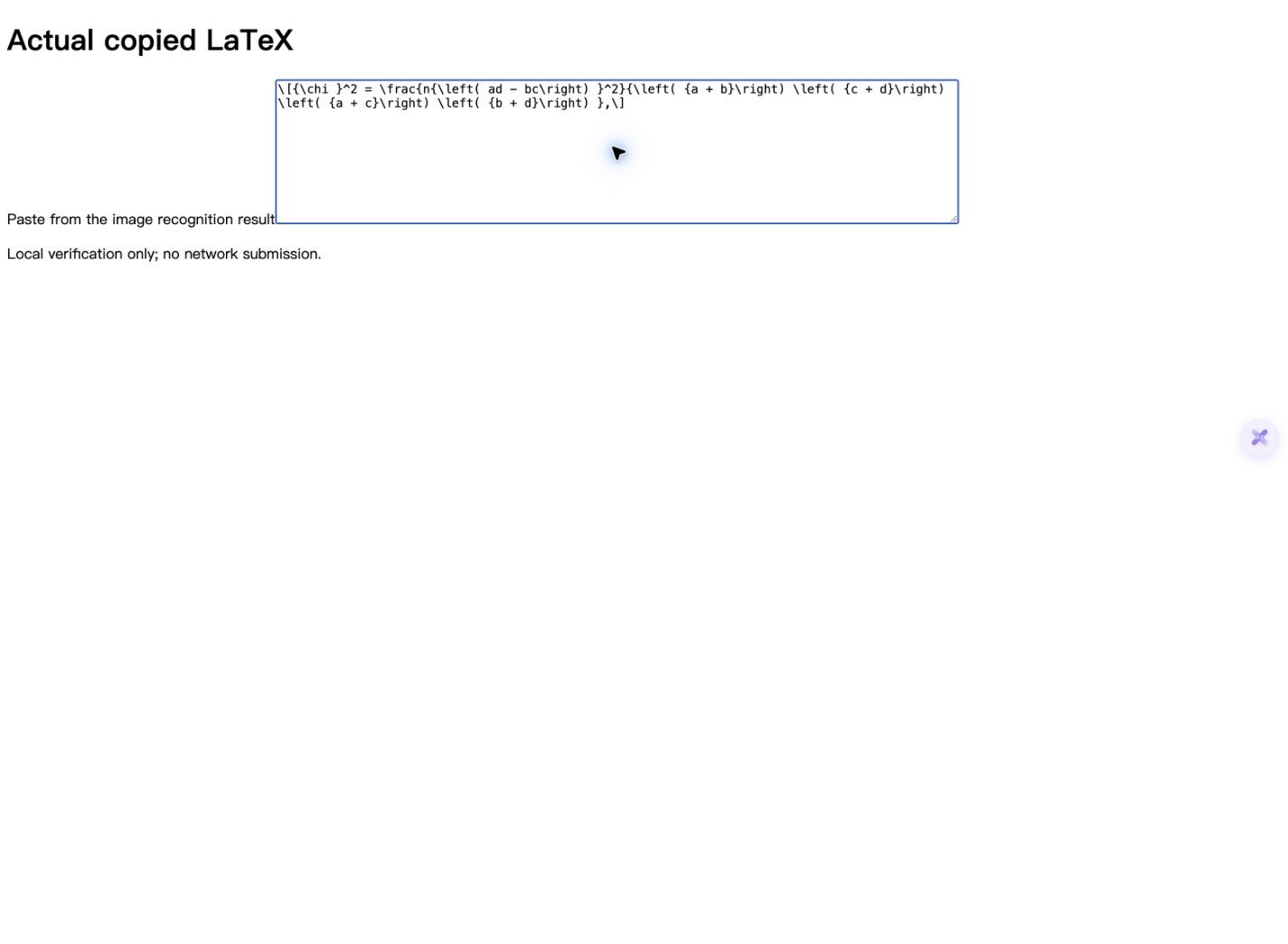
- Paste into a text editor first and inspect the actual source. In this run, whole-result copy included a section command; node copy returned one display-math fragment. They are not interchangeable snippets.
- Integrate the reviewed expression into your target document, using the required math environment and packages. Preview it and compare signs, grouping and punctuation again before relying on it.
Current sign-in, image limits and quota apply. A successful recognition or compilation does not prove the mathematical content or provide a solution to the equation.
One screenshot, two actual copy results
On 14 October 2026, we uploaded the public chi-square formula crop as a PNG and recognized it with Doc2X. We clicked the whole-result and selected-node copy controls, then pasted the actual system clipboard contents into a local text field. Both raw snippets are available below.
 Enlarge image ↗
 Enlarge image ↗
 Enlarge image ↗
 Enlarge image ↗
| Control used | Observed output | Use after reviewing |
|---|---|---|
| Copy LaTeX: whole result | A section command containing inline math | Retain or adapt the document structure deliberately |
| Copy node content | One bracket-delimited display formula | Integrate into an appropriate math environment |
| Punctuation | Trailing comma in both raw copies | Keep or adjust according to the surrounding sentence |
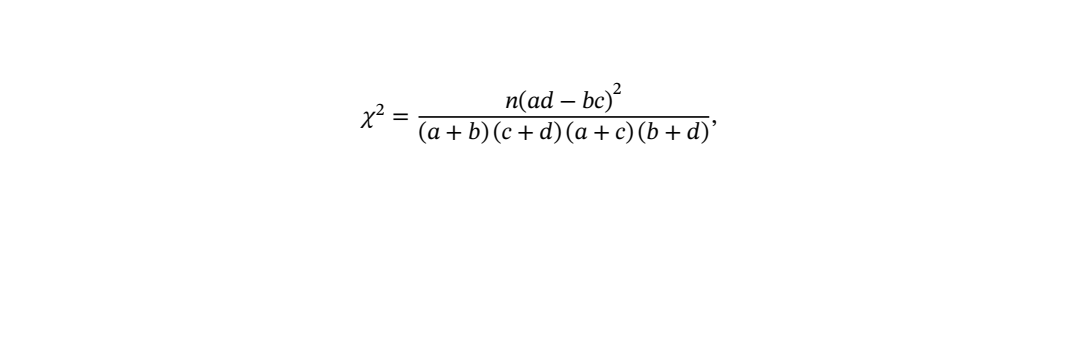
| Local compilation | Both pass in the supplied local wrappers | Passing syntax does not prove mathematical fidelity |
- The left side is chi squared. The numerator is n multiplied by the square of the entire ad−bc group, not merely by bc squared.
- The denominator contains four separate factors: (a+b), (c+d), (a+c) and (b+d). Their parentheses and multiplication order are visible in the raw node copy.
- The source screenshot ends with a comma; both copied strings retain it. The raw files have not been silently cleaned up for presentation.
- The global copy panel showed body-only and $/$$ preferences. The actual whole-result copy nevertheless included a section command, while the stored node copy used bracket display delimiters. Inspect the actual paste for the chosen control.
- The node copy is 141 characters and the whole-result copy is 151 characters including its newline. Both were compiled unchanged inside locally authored wrappers with XeLaTeX / TeX Live 2023; the whole-result wrapper produced font-substitution warnings.
The input comes from an already published public exam crop; PNG conversion preserved its RGB pixels. This is one typeset example, not a handwriting or low-resolution accuracy benchmark. The task was left at saved version 0. No Mathpix comparison, correction or equation solving was performed. Local rendering used an added article/preamble wrapper, so the copied fragments are not presented as complete standalone projects.
What to check
Upload a clear formula image, compare the recognized expression with the screenshot and copy the scope you need. For one selected formula in the structured workspace, Copy node content (复制节点内容) returns its formula fragment. Copy LaTeX (复制 LaTeX) for the whole result can also include document structure. Check delimiters, parentheses, exponents and punctuation before pasting into your existing document.
- Actual input
- A 485×94 PNG made from an already public formula crop, with unchanged RGB pixels.
- Recognition
- Doc2X model, saved version 0; no edited characters or image enhancement.
- Actual copy check
- Both product copy buttons were tested with real system clipboard paste into a local textarea.
- Compile scope
- Unchanged snippets compiled inside small local wrappers; those wrappers are not product exports.
Inspect the exact paste before adding it to a document
Actual selected-node copy
\[{\chi }^2 = \frac{n{\left( ad - bc\right) }^2}{\left( {a + b}\right) \left( {c + d}\right) \left( {a + c}\right) \left( {b + d}\right) },\]This unchanged display fragment includes its own bracket delimiters and the source comma. Do not wrap it in a second display-math environment without adapting the boundaries.
Actual whole-result LaTeX copy
\section*{${\chi }^2 = \frac{n{\left( ad - bc\right) }^2}{\left( {a + b}\right) \left( {c + d}\right) \left( {a + c}\right) \left( {b + d}\right) },$}
The body-only setting does not mean this observed result is just an unwrapped equation. The section command changes document structure; use the node fragment when that is the appropriate scope.
Choose the right starting point and output scope
| What you have or need | Route | Check |
|---|---|---|
| One formula screenshot | Image recognition, then selected formula content | Complete crop, symbols, brackets and delimiters |
| Image with text and multiple equations | Whole-result copy or document export | Paragraph structure, reading order and inline/display math |
| A complete paper PDF | PDF-to-LaTeX project export | Images, preamble, compiler and missing content |
| LaTeX source already available | Reuse and review the source | Avoid unnecessary screenshot recognition |
| A Word/MathType editing deliverable | The supported copy/export format | Object type and target software compatibility |
Image to LaTeX starts with the full equation
A clipped root, exponent or parenthesis can change meaning. This fixed input contains the entire fraction and a trailing comma. Keep enough context to identify variable definitions, and use the original document when the screenshot alone is ambiguous.
Review grouping before visual polish
In the example, the exponent 2 applies to the full ad−bc expression, and the denominator is a product of four sums. A visually similar fraction can still be mathematically different. Check grouping, signs and subscripts independently of fonts or spacing.
Whole-result copy and selected-node copy are different
The actual whole-result clipboard string includes a section command around inline math. The selected-node clipboard string is a display fragment. A setting called body-only removes a preamble; it does not promise that every document-structure command disappears. Use the pasted text itself as the evidence.
Match LaTeX delimiters to the destination
An existing Overleaf or LaTeX project already has a document environment. Insert only the reviewed fragment at the intended location, with appropriate inline or display boundaries. Nested or mismatched math delimiters can produce errors. Keep preamble settings and formula content separate.
Compilation is a syntax and environment check
The two raw copies compiled in a small local wrapper with the required math/font packages. That result does not establish the original author’s syntax, statistical assumptions or correctness for another equation. The whole-result wrapper also reported font substitution, which affects appearance rather than validating meaning.
Model choices and editing need their own review
The tested result uses Doc2X only. If your task offers other models, confirm the active result before copying and compare actual outputs. Save any edits before copying/exporting. Different interfaces or older results can expose different controls, so follow the current task state.
Detailed tool instructions
English Help explains saved versions, model selection, copy scope and current structured-image controls.
Troubleshooting
- A symbol or exponent is missing
- Check whether the screenshot clipped it or whether the recognition differs. Review the source before changing the expression.
- Pasting adds an unexpected heading
- Inspect whether whole-result copy added section structure. For one expression, compare the selected-node fragment instead of assuming both controls produce identical text.
- LaTeX errors appear after pasting
- Check nested math boundaries and the target preamble. The provided snippets are fragments; the local validation wrappers are separately labelled.
- The result contains a comma I did not expect
- The source image itself has one. Decide how it belongs in your sentence; the raw examples preserve what was copied.
- I need editable Word or MathType, not TeX
- Choose the supported output for that editing environment and verify objects and compatibility. Copying source text is a different operation.
Frequently asked questions
Can I turn a screenshot of a formula into LaTeX?
This example was uploaded, recognized and copied from the current product. Download its input and exact clipboard outputs, then review your own expression’s structure.
Does Copy LaTeX always return only the equation?
Not in this observed whole-result copy: it includes a section command. The selected-node copy returns the formula fragment. Inspect the chosen output before pasting.
Was the shown source copied from the actual result?
Yes. Product copy buttons were used and the system clipboard was pasted into a local textarea. The raw copied files are unchanged.
Can I paste the fragment into Overleaf?
Use it inside a suitable existing project and check its math delimiters and required packages. The sample was compiled locally, not in an Overleaf cloud project.
Does this prove all formula images are recognized accurately?
No. It is one typeset formula with a known source. Handwriting, blur, complex systems and ambiguous notation need separate checks.
Checked: 2026-10-14. Check the current tool for limits and conditions.